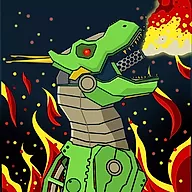
Mechabots
Terminarch Gamesshare
898
271
0

Doodle God
BoxRob 2
boxrob
BoxRob 3
JollyWorld
Isotiles
Maze: Path of Light
Cubinko
FireBlob
Mini Flips

Mini Springs
Bridge of Doom

Rhomb

Void

Castle Woodwarf
LinQuest
Plactions

Catch The Thief
Mosaic Puzzle Art
Path Seeker
Twice
Skillteam
Replacement
ArithmeticA
RedBlue
Factory Balls Forever
Tumble

Tumble II
Painty Tumbler
Wood Blocks 3D
Pushbox
State.io Conquer The World
Turnbox

Power Light
3 Mice

FireBlob Winter
Number Masters

Cactu-Sama

Idle Ants
Rope Master
CircloO
CircloO 2
AIR STRIKE WAR
Lines to Fill

Word Search
BombHopper
11-11

MicroWars
London Jigsaw Puzzle

Shapes
Free The Key
Merge the Numbers
Amazing Word Fresh

Old Towers
Gem 11

Arrower
Onet Master

Jump and Hover
Tower of Hanoi

Mika Candy Adventure

Energy

Cover Orange: Journey

Brain Dozer

2048
UnpuzzleX

Wind Rider

Exceptions
One Cut
Block Blast

Infinity Loop: Hex

Find The Candy

Doctor Acorn 3

Doctor Acorn 2
This Side Up
Power Boxes

Floods
Plumbing

Pet Party Columns

Turn The World
Mystical Birdlink
Card Hog

Hop Warp

Winter Gifts
Sudoblocks
Amazing Dominoes
Game Introduction
Mechabots
About Mechabots
Ονειρευτήκατε ποτέ να φτιάξετε το δικό σας μηχανικό τέρας; Στο Mechabots, μπορείτε να απελευθερώσετε τον μηχανικό που κρύβετε μέσα σας και να συναρμολογήσετε απίστευτους ρομποτικούς δεινόσαυρους! Αυτή η συναρπαστική προσομοίωση θα δοκιμάσει την ακρίβεια και την ικανότητά σας καθώς συναρμολογείτε υπέροχα mech. Είναι η τέλεια επιλογή αν ψάχνετε για διασκεδαστικά online παιχνίδια όταν βαριέστε, προσφέροντας μια πραγματικά συναρπαστική εμπειρία. Ως ένα από τα καλύτερα δωρεάν online παιχνίδια, το Mechabots προσφέρει ώρες ψυχαγωγίας χωρίς να κοστίζει ούτε δεκάρα, επιτρέποντάς σας να βουτήξετε κατευθείαν στη δράση.
- Φτιάξτε το δικό σας Mech: Ξεπακετάρετε κιτ κατασκευής και συναρμολογήστε το δικό σας απίστευτο mechabot κομμάτι-κομμάτι.
- Σχέδια Δεινοσαύρων: Επιλέξτε από μια ποικιλία εντυπωσιακών φιγούρων T-Rex και φέρτε αυτά τα προϊστορικά κτήνη ξανά στη ζωή σε μηχανική μορφή.
- Δοκιμάστε την ακρίβειά σας: Προσαρμόστε προσεκτικά κάθε εξάρτημα, θέτοντας τις ικανότητες και την ακρίβειά σας στην απόλυτη δοκιμασία σε αυτή την ελκυστική προσομοίωση.
- Αποτελέσματα γεμάτα δράση: Μόλις συναρμολογηθεί, γίνετε μάρτυρες της εκπληκτικής δύναμης της δημιουργίας σας καθώς ζωντανεύει με φλογερά κινούμενα σχέδια.
How to play Mechabots online?
Κανόνες παιχνιδιού:
- Επιλέξτε το Mechabot σας: Ξεκινήστε επιλέγοντας από μια ποικιλία τρομερών μοντέλων T-Rex. Κάθε ρομποτικός δεινόσαυρος προσφέρει μια μοναδική πρόκληση συναρμολόγησης και οπτικό σχεδιασμό.
- Ανοίξτε το κιτ: Ανοίξτε το εικονικό σας κιτ κατασκευής για να αποκαλύψετε όλα τα απαραίτητα εξαρτήματα, γρανάζια και κυκλώματα που απαιτούνται για την κατασκευή του Mechabot που επιλέξατε.
- Ακολουθήστε το προσχέδιο: Παρατηρήστε προσεκτικά το παρεχόμενο προσχέδιο ή τη σιλουέτα. Αυτό σας καθοδηγεί για το πού ανήκει το κάθε εξάρτημα στην τελική συναρμολόγηση.
- Συναρμολογήστε με ακρίβεια: Κάντε κλικ και σύρετε τα σωστά κομμάτια στα καθορισμένα σημεία τους. Το παιχνίδι απαιτεί δεξιότητα και ακρίβεια, οπότε βεβαιωθείτε ότι κάθε εξάρτημα κουμπώνει στη θέση του τέλεια.
- Ολοκληρώστε την κατασκευή: Συναρμολογήστε με επιτυχία όλα τα εξαρτήματα για να ζωντανέψετε τον μηχανικό T-Rex σας! Θαυμάστε τη δημιουργία σας καθώς ολοκληρώνεται κομμάτι-κομμάτι.
Χειρισμός:
- Επιλογή εξαρτημάτων: Χρησιμοποιήστε το αριστερό κουμπί του ποντικιού για να κάνετε κλικ σε ένα κομμάτι από το κιτ κατασκευής σας.
- Τοποθέτηση εξαρτημάτων: Κρατώντας πατημένο το αριστερό κουμπί του ποντικιού, σύρετε το επιλεγμένο κομμάτι στη σωστή του θέση στο προσχέδιο του ρομπότ.
- Χρήση εργαλείων: Εάν απαιτούνται εργαλεία για συγκεκριμένα εξαρτήματα, επιλέξτε τα με ένα αριστερό κλικ και χρησιμοποιήστε τα σύμφωνα με τις οδηγίες.
Συχνές Ερωτήσεις:
- Ε: Τι συμβαίνει αν τοποθετήσω ένα κομμάτι σε λάθος σημείο;
- Ε: Υπάρχουν διαφορετικά επίπεδα δυσκολίας;
- Ε: Μπορώ να προσαρμόσω τα χρώματα του Mechabot μου;
Στα Mechabots, τα κομμάτια συνήθως κουμπώνουν στη θέση τους μόνο αν βρίσκονται στη σωστή τοποθεσία σύμφωνα με το προσχέδιο. Αν ένα κομμάτι είναι λάθος, πιθανότατα θα επιστρέψει στο κιτ, επιτρέποντάς σας να δοκιμάσετε ξανά.
Η δυσκολία ποικίλλει ανάλογα με το μοντέλο T-Rex που επιλέγετε. Ορισμένα μοντέλα έχουν πιο περίπλοκα εξαρτήματα και απαιτούν πιο σύνθετα βήματα συναρμολόγησης, προκαλώντας την αντίληψη του χώρου και την ακρίβειά σας.
Τα Mechabots επικεντρώνονται κυρίως στην προσομοίωση συναρμολόγησης. Αν και επιλέγετε ανάμεσα σε διαφορετικά προσχεδιασμένα μοντέλα, η εξατομικευμένη αλλαγή χρωμάτων των εξαρτημάτων δεν αποτελεί βασικό χαρακτηριστικό του κανονικού παιχνιδιού.